Terminology
ESP RainMaker Neo uses a small set of words very precisely, and most confusion in support threads comes from two of them being swapped. This page is the reference every other page links to when it uses a term without explaining it.
Much of this vocabulary will be familiar if you have worked with ESP RainMaker before.
Node, Device, Parameter, Service
These four nest inside each other, and the nesting is the whole data model.
Node — one ESP32-series chip with its own identity and cloud credentials. A Node is the unit that connects, the unit that is registered. It typically goes within a real device like a fan, or refrigerator. Its identifier, the Node ID, is the same string as the AWS IoT thing name and the MQTT client ID. On the firmware side esp_rmaker_get_node_id() returns it.
Device — a logical, user-controllable entity inside a Node: a switch, a light, a thermostat. One Node has one or more Devices, so a two-gang smart switch is one Node with two Devices. Created with esp_rmaker_device_create().
Parameter — one controllable or observable value within a Device: power state, brightness, measured temperature. Created with esp_rmaker_param_create().
Service — a node-level capability that is structurally the same as a Device, but not meant to be presented to the user as a controllable parameter: time and timezone, local control, OTA. The distinction is about UI presentation, not structure — a service exposes control surface, not a user-facing entity. Created with esp_rmaker_service_create(), and it lands in the same place in the Node configuration that a Device does.
Now, let's look at a real example to understand this better. Take a ceiling fan with a built-in lamp: one ESP32 module drives both, so it is one Node carrying two Devices — the app shows the user a fan tile and a light tile.
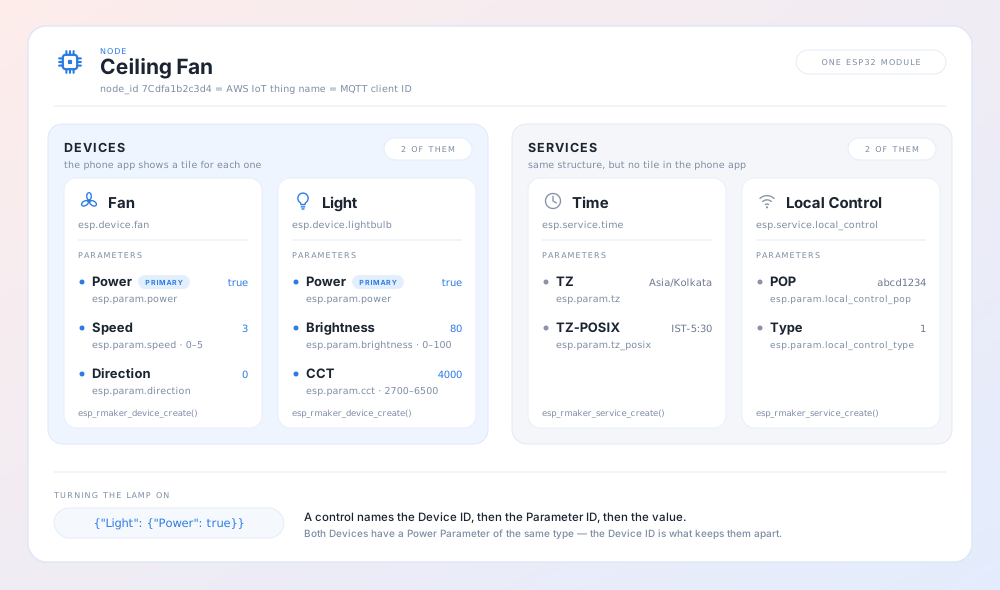
Everything above is a single Node — one set of credentials, one MQTT connection, one thing an operator registers and a User owns. The Time and Local Control cards show why Services sit at the same level as Devices: same structure, same kind of Parameters, and only the UI treatment differs.
IDs and types
Every Device and Parameter carries both an ID and a type, and they do different jobs.
The ID (device_id, param_id) is the addressing key. It is what appears in shadow documents and in parameter-set payloads, keyed as device ID, then parameter ID, then value.
The type is a standard string such as esp.device.light or esp.param.power. It is how clients, voice assistants, and group control recognise what kind of thing this is without knowing the product.
One Parameter on a Device can be marked the primary one with esp_rmaker_device_assign_primary_param(), similarly one Device on a node can be marked as Primary. These are hints for the UI (phone apps, voice assistants) to provide a better user experience to the users.
Attributes and Tags
Attributes and Tags are name/value metadata that can be associated with a node.
Attributes are static facts declared in firmware and published as part of the Node configuration — esp_rmaker_node_add_attribute(), esp_rmaker_device_add_attribute(). They describe the product. They are not queryable across a fleet. Apps can use the attributes for understanding more information about a product.
Tags are mutable. They can facilitate administrative actions like fleet-wide grouping for nodes. Tags are indexed, to facilitate better querying. Tags have a defined scope:
admin— written by an operator through the admin REST API.device— reported by the Node itself, for example firmware version, model, device type.user— set by the end user, for example room or location.
On the firmware side esp_rmaker_node_add_tag() stores a tag without reporting it; esp_rmaker_node_update_tag() sets it and reports it in the same call.
If the answer is "so my dashboard can filter 10,000 Nodes by it", you want a Tag. If the answer is "so the phone app knows what this product is", you want an Attribute.
Groups and Subgroups
Group — a logical collection of Nodes and Subgroups. It is easiest to read as a home. A Group is also the access-control boundary: what a User can reach is derived from the Groups and Subgroups they have access to, never from a per-Node access list. A User may have several Groups.
Subgroup — a nested group inside a Group, typically a room.
The rules worth memorising:
- A Node belongs to exactly one Group at a time. Adding it to a second Group removes it from the first.
- A Node can be in at most three Subgroups of its Group.
- Primary access to a Group implies access to all of its Subgroups.
- Group IDs are 6 characters — a lowercase letter followed by five lowercase alphanumerics. Subgroup IDs are 3 characters. Lowercase throughout, so support conversations never hinge on capitalisation.
Access to a Group comes in three levels: primary (full control, including adding Nodes and sharing), secondary (can use and reorganise, cannot add or remove Nodes, cannot share), and subentity (access to named Subgroups only).
Admin Node Group is a different concept with a confusingly similar name. It groups Nodes owned by admins and exists to facilitate better administrative tooling. Admin Node Groups are not visible to end users.
Users and admins
User — an end-user account, identified by user_id. Users interact with the devices through the phone apps.
Admin — an administrator account. An administrator can perform administrative actions like OTA Firmware Updates, or configuring backend settings.
Schedules and Automations
Both automate behaviour; they run in different places, and that is the distinction that matters.
Schedule — a time-based rule stored against a single Node and executed on the Node, from its own real-time clock. The cloud's job is to store the Schedule set and push it down whenever it changes. Because evaluation is local, Schedules keep firing while the Node is disconnected from the cloud.
Automation — a Group-scoped rule that is evaluated in the cloud. It references one or more Triggers in a boolean and/or condition, and when that condition holds it runs actions that set Parameters on Nodes in the Group. Cross-Node behaviour is therefore Automations, not Schedules.
Trigger — the per-node trigger condition. A Trigger is a per-Node named condition, such as "light power turned on". Its definition is stored by the cloud and pushed to the firmware, and the firmware is what watches the physical condition. When it fires, the Node reports it, and the cloud re-evaluates any Automation referencing it.
So: Triggers are the sensors, Automations are the wiring, and Schedules are a clock the Node owns. See Schedules and Automation Triggers for the behaviour of each.
Common Terms: Registration, claiming, provisioning, association
- Registration — Any node requires a valid certificate to connect to the ESP RainMaker Neo cloud backend. An administer has to explicitly register a node in the cloud backend for the node to connect. This registration step creates the AWS IoT thing named after the Node ID, attaches its X.509 certificate, and records it in the cloud. This is typically done in bulk from a CSV file, before your devices ship.
- Claiming — In order to make registration simpler, the public ESP RainMaker Neo deployment provides a feature called claiming. This allows the public deployment's users to register their nodes in the cloud, without having to be an administrator of the deployment.
- Wi-Fi provisioning — Wi-Fi Provisioning is the process of configuring a node (ESP32 device), typically by a phone app, by providing it the Wi-Fi credentials and other configuration settings. Once Provisioned, a node can connect to the Wi-Fi (and hence the cloud backend) and be accessible locally or remotely over Wi-Fi.
- User–Node Association — For a user to be able to control the device, the user needs to prove the ownership of that device. This is the step that establishes ownership; see User–Node Association.
Related
- System Architecture — where each of these entities physically lives
- User–Node Association — Groups as the ownership boundary, in detail
- Node–Cloud Communication — how shadows, topics, and Parameters behave on the wire
- Data model — building Nodes, Devices, and Parameters in firmware
- Standard types — the
esp.device.*andesp.param.*type strings