Data model
The data model is the contract between your firmware and everything else — the phone app, the dashboard, voice assistants, schedules, and automations. Get it right and the app renders a sensible UI and Alexa understands your device with no extra work. Get it wrong and everything downstream sees an opaque blob.
This page is the firmware-side view. For the exact JSON the node publishes, see Firmware specifications → Node Configuration.
The hierarchy
A typical hierarchy of data model components is shown below.
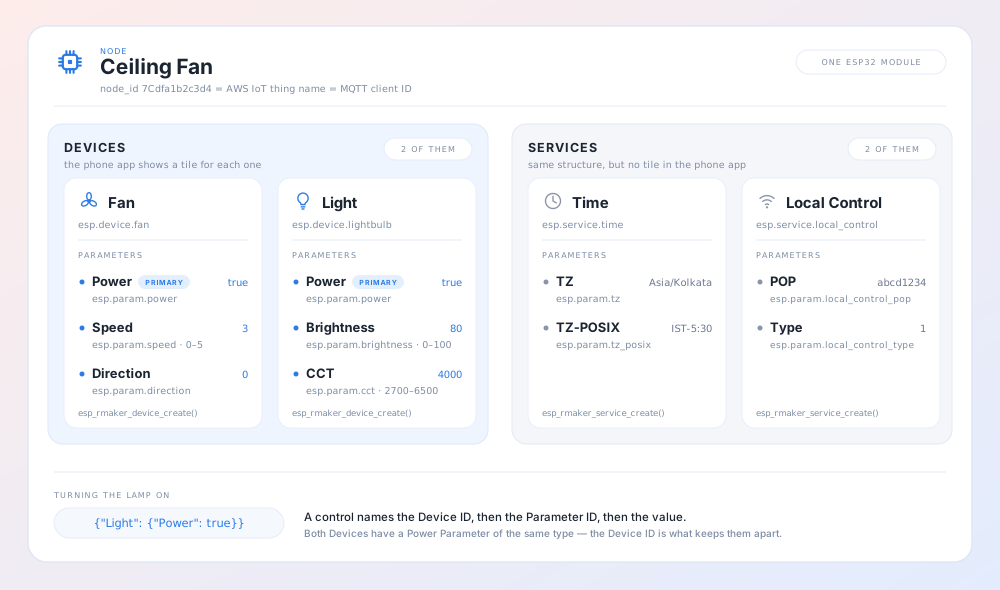
| Level | Handle | Carries |
|---|---|---|
| Node | esp_rmaker_node_t | name, type, model, fw_version · attributes · tags |
| Device | esp_rmaker_device_t | a type string such as esp.device.lightbulb · attributes · a primary parameter |
| Service | esp_rmaker_device_t | a type string such as esp.service.time — the same handle type as a device |
| Parameter | esp_rmaker_param_t | a type string such as esp.param.brightness · a value · property flags · bounds, UI type, array max |
One firmware image is one node. A node can carry any number of devices and services, and each of those any number of parameters.
Devices and services
/* A generic device */
esp_rmaker_device_t *dev = esp_rmaker_device_create("My Sensor",
                                                   ESP_RMAKER_DEVICE_TEMP_SENSOR,
                                                   priv_data);

/* A service — same handle type, different role */
esp_rmaker_device_t *svc = esp_rmaker_service_create("My Service",
                                                     "custom.service.thing",
                                                     NULL);

esp_rmaker_node_add_device(node, dev);
The difference between a device and a service is semantic: a device is a user-facing appliance the app renders controls for; a service exposes control or configuration surface that isn't an appliance. The SDK's own timezone, system, and local-control services are ordinary services created this way.
Device IDs must be unique within a node, and parameter IDs unique within a device.
Standard device helpers
For the common shapes, use the helper that creates the device, adds the mandatory parameters, and assigns the primary parameter in one call:
| Helper | Device type |
|---|---|
esp_rmaker_switch_device_create(id, priv, power) | esp.device.switch |
esp_rmaker_lightbulb_device_create(id, priv, power) | esp.device.lightbulb |
esp_rmaker_fan_device_create(id, priv, power) | esp.device.fan |
esp_rmaker_temp_sensor_device_create(id, priv, temperature) | esp.device.temperature-sensor |
These also add the standard Name parameter, which is what lets a user rename the device in the app. Name changes are handled internally by the SDK — unless you register a bulk write callback, in which case you must handle ESP_RMAKER_PARAM_NAME yourself (see Callbacks and events).
Primary parameter
esp_rmaker_device_assign_primary_param() marks the one parameter that represents the device's headline state — Power for a light, a switch, or a fan; Temperature for a sensor. Phone apps use it for the tile control on the device list; voice assistants use it to resolve "turn on the lamp". The standard device helpers set it for you.
Parameters
esp_rmaker_param_t *param = esp_rmaker_param_create(
    "Brightness",                     /* id, unique within the device */
    ESP_RMAKER_PARAM_BRIGHTNESS,      /* type, or NULL for untyped */
    esp_rmaker_int(50),               /* initial value — also fixes the value type */
    PROP_FLAG_READ | PROP_FLAG_WRITE | PROP_FLAG_PERSIST);

esp_rmaker_param_add_bounds(param, esp_rmaker_int(0), esp_rmaker_int(100), esp_rmaker_int(1));
esp_rmaker_param_add_ui_type(param, ESP_RMAKER_UI_SLIDER);
esp_rmaker_device_add_param(dev, param);
The value constructor determines the parameter's type for its whole lifetime:
| Constructor | Value type |
|---|---|
esp_rmaker_bool(bool) | RMAKER_VAL_TYPE_BOOLEAN |
esp_rmaker_int(int) | RMAKER_VAL_TYPE_INTEGER |
esp_rmaker_float(float) | RMAKER_VAL_TYPE_FLOAT |
esp_rmaker_str(const char *) | RMAKER_VAL_TYPE_STRING |
esp_rmaker_obj(const char *) | RMAKER_VAL_TYPE_OBJECT — a JSON object as a string |
esp_rmaker_array(const char *) | RMAKER_VAL_TYPE_ARRAY — a JSON array as a string |
Updating a parameter with a mismatched type fails with ESP_RMAKER_INVALID_ARG.
Property flags
Flags are OR-ed together and decide how the SDK treats the parameter:
| Flag | Effect |
|---|---|
PROP_FLAG_READ | Readable from the cloud. |
PROP_FLAG_WRITE | Writable from the cloud. Omit it for sensor readings so the app renders them read-only. |
PROP_FLAG_PERSIST | Value is stored in NVS on every update and restored on boot. The restore is replayed through your write callback with source ESP_RMAKER_REQ_SRC_INIT. |
PROP_FLAG_TIME_SERIES | Every update is queued as a timestamped data point. See Time series data. |
PROP_FLAG_TS_CUMULATIVE | As above, for monotonically increasing counters (energy meters, run hours). |
PROP_FLAG_INDEXED | Value is also written to the indexed shadow, which makes it searchable from the dashboard and admin APIs. |
Some combinations are worth knowing:
- A sensor:
PROP_FLAG_READ | PROP_FLAG_TIME_SERIES— readable, historical, not writable. - A user setting that must survive a power cut:
PROP_FLAG_READ | PROP_FLAG_WRITE | PROP_FLAG_PERSIST. - A fleet-searchable attribute: add
PROP_FLAG_INDEXED. Don't add it to fast-changing values — every update writes the indexed shadow too.
Bounds, UI hints, array limits
| API | Purpose |
|---|---|
esp_rmaker_param_add_bounds(param, min, max, step) | Min, max, and stepping for integer/float params. Pass step 0 for none. |
esp_rmaker_param_add_ui_type(param, ui_type) | Tells clients which widget to render. |
esp_rmaker_param_add_array_max_count(param, count) | Caps the element count of an array parameter. |
Bounds and array limits are advertised to clients, not policed by the core. esp_rmaker_param_update() does validate against bounds, but a value arriving through a write callback is yours to check before you act on it. Validate in your callback.
Standard UI types are esp.ui.toggle, esp.ui.slider, esp.ui.dropdown, esp.ui.text, esp.ui.hue-slider, esp.ui.hue-circle, esp.ui.push-btn-big, esp.ui.trigger, esp.ui.hidden, and esp.ui.qr-scan — see Custom & standard types → UI elements for the data types and bounds each one needs.
esp.ui.hidden is useful for parameters your firmware needs to round-trip but a user should never see.
Standard types vs custom types
Every device, parameter, and service carries a type string. Standard types are the esp.* strings defined in esp_rmaker_standard_types.h; they are the ones clients recognise.
Use a standard type when one fits. A parameter typed esp.param.brightness gets a brightness slider in the app and works with "dim the lamp to 30%" out of the box. The same parameter typed my.param.bright renders as a generic control and is invisible to voice assistants.
Use a custom type when nothing fits. Pick your own namespace (not esp.) and be consistent:
esp_rmaker_param_t *p = esp_rmaker_param_create("Filter Life",
                                                "acme.param.filter-life",
                                                esp_rmaker_int(100),
                                                PROP_FLAG_READ);
esp_rmaker_param_add_ui_type(p, ESP_RMAKER_UI_TEXT);
Custom-typed parameters still work end to end: they are reported, they are writable, they fire automations. What they lose is the client-side semantics — you will need a custom app or dashboard view to present them well.
You can also pass NULL as the type. The parameter then has no type at all, which is fine for internal values but means nothing downstream can reason about it.
Standard type reference
Every standard device, service, parameter, and UI element — with data types, UI types, properties, bounds, and the Alexa and Google categories each maps to — is tabulated in Custom & standard types.
Attributes and tags
Both are string key/value pairs, but they serve different purposes.
Attributes are static metadata — serial numbers, hardware revisions, capability strings. They are part of the node configuration and are not expected to change at runtime:
esp_rmaker_node_add_attribute(node, "Serial Number", "0123456789");
esp_rmaker_device_add_attribute(dev, "Sensor Vendor", "acme");
Tags are node-level key/value pairs reported to the indexed shadow, which is what makes them searchable — the Admin Dashboard's advanced search reads them, so tags are how you slice a fleet by room, production batch, or hardware revision:
esp_rmaker_node_add_tag(node, "room", "kitchen");      /* stored, not reported */
esp_rmaker_node_update_tag(node, "room", "bedroom");   /* stored and reported */
Use add_tag before esp_rmaker_start() and update_tag afterwards. Setting a tag that already exists overwrites it. The reserved tags name, type, fw_version, and model are maintained by the SDK to mirror the node info.
Reporting configuration changes
esp_rmaker_start() publishes the node configuration if its checksum differs from the value persisted in NVS — so a reboot with unchanged firmware costs nothing. If you add or remove devices at runtime, call esp_rmaker_report_node_config() to push the new shape.
esp_rmaker_node_clear_stored_values() and esp_rmaker_device_clear_stored_values() wipe persisted parameter values, which is what the reset-data console command and the system service's data reset use.
Related
- Custom & standard types — the full type reference
- Callbacks and events — reacting to writes, reporting state
- Time series data — the timeseries flags in practice
- Firmware specifications → Node Configuration — the published JSON schema
- Firmware specifications → State Management — shadows, indexed params, and reporting semantics